Inverting Datasets
You can invert the values of images, as well as the labeled voxels of regions of interest and multi-ROIs, in any axis and change the order of axes in which they are read in the Dataset Inverter panel.
Right-click the data you want to invert and then choose Modify and Transform > Invert in the pop-up menu to open the Dataset Inverter panel, shown below.
Dataset Inverter panel
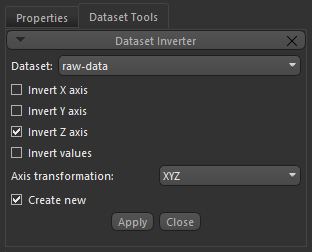
| Description | |
|---|---|
| Invert X axis | If selected, all data along the X axis will be read from maximum to minimum values. |
| Invert Y axis | If selected, all data along the Y axis will be read from maximum to minimum values. |
| Invert Z axis | If selected, all data along the Z axis will be read from maximum to minimum values. |
| Invert values* | If selected, all data being read will be inverted, so minimum values become maximum values and vice versa. |
| Axis transformation |
Allows you to determine the order of axes in which they are read. Choices are:
XYZ… Default order. XZY… The Y and Z axes are interchanged. YXZ… The X and Y axes are interchanged. YZX… All three axes are interchanged. ZXY… All three axes are interchanged. ZYX… All three axes are interchanged. |
* Available for images and regions of interest only.
 How to Invert a Dataset
- Right-click the required dataset in the top section of the Data Properties and Settings panel and then choose Invert Dataset in the pop-up menu.
The Invert Dataset panel appears on the Dataset Tools tab.
- Select the item(s) required to invert your dataset, as described above.
- Check the Create new option, if required. If checked, a new dataset will be created with the selected changes.
- Click the Apply button.
